Latest version 0.1
Released 1 year ago on 21st Feb, 2025
Initial release. Testers and feedback wanted! Please expect changes.

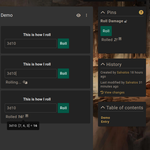
This plugin allows you to create dice macros in any entry, and potentially transclude them into other pages (or even sidebars!). Dice rolling logic is handled by the RPG Dice Roller library – please follow the link for instructions and examples of syntax and available features.
Transcluding a macro is very easy. Simply create a mention to the macro’s entry using advanced mention syntax (which you can enable in your profile settings under Appearance), then add the field:attributes property like so: [note:12345|field:attributes]. Instead of linking to the entry, the actual dice roller will be rendered in an iframe.
I recommend adding the following CSS rule to your campaign styles to keep the dice roller iframe only as big as needed. This will apply to any entry tagged "Dice Macro" and transcluded with the field:attributes syntax. Unfortunately, I cannot include this with the plugin out of the box since its CSS is only loaded inside the iframe, and therefore cannot affect the iframe’s outer dimensions.
/* Dice Macro transclusion iframe */
.entity-attributes-render[data-entity-tags~="dicemacro"] {
  height: 120px;
  max-width: 300px;
}
If you use different kinds of macros and tag them accordingly, you can even create different rules to have custom dimensions based on other tags as well.
Transclusion also works in property values, so you can pin a dice roller to any entry’s sidebar using the same method! Simply create a standard property, put in the mention with the same syntax as above and click the pin icon to pin the property. To account for the much smaller area, you may want to use macros specifically made for this purpose, without a title (the property’s name can fulfill that role) and with Disable Input checked to keep only the button and result visible.
The dice roller’s main container includes the data-entity-tags attribute, allowing you to style various rollers based on their entry’s tags. For example, you could have "Attack Macro" and "Damage Macro" tags on various macros and style rollers differently for each category. These tags are given in slug form, as in other parts of Kanka. For example, to give a much bigger title to those Attack Macros:
.rpg-dice-roller[data-entity-tags~="attackmacro"] h4 { font-size: 20px }RPG Dice Roller is shared under the MIT license.
Want to show appreciation for my plugins or request one-on-one CSS help? I accept tips on Ko-fi (no account needed): 
Released 1 year ago on 21st Feb, 2025
Initial release. Testers and feedback wanted! Please expect changes.

That would be tricky since it would need a place to store them, and a place and specific format to display them in. Not impossible, but it would probably require a custom solution rather than being added to the plugin for the general public. Feel free to e-mail me if you would like to commission something like that.
I believe Kanka’s (deprecated) Diceroll module does save rolls, though, if you want to look into that instead. It works very differently from this, but might suit your needs.

That would be tricky since it would need a place to store them, and a place and specific format to display them in. Not impossible, but it would probably require a custom solution rather than being added to the plugin for the general public. Feel free to e-mail me if you would like to commission something like that.
I believe Kanka’s (deprecated) Diceroll module does save rolls, though, if you want to look into that instead. It works very differently from this, but might suit your needs.