Latest version 0.3
Released 6 months ago on 20th Mar, 2026
*sigh*
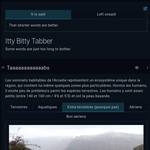
This plugin offers a more convenient alternative to my Easy Tabs to generate tabbed content in entry descriptions and articles. In addition to being simpler to create, the resulting tabs have better interactivity as well as support for screen readers and keyboard-based navigation. And since it requires no visible markup, your content will still look normal if you remove the plugin or if your campaign is no longer Premium.
Note that in other areas like dashboard widgets and the map sidebar, your content will not be tabbed and will flow as you see it in the editor.
This plugin does not include any properties, but applying the kit will activate its functionality on the entry.
Create a new article, and in the Article layout dropdown, select Properties. This will inject the plugin’s script into the Overview page of the entry. Give your article a title, check that all settings are as desired, and save. Once activated, the article will be invisible in your Overview, but you can edit or delete it via a new button at the bottom of the left-hand entry menu.
In the HTML view of the editor, you will need to insert two HTML tags to indicate where the tabs begin and end. This allows the plugin to identify multiple groups of tabs in any given page. To do so, insert div elements with the class tabber-start or tabber-end, respectively. The first one can also have a second class to indicate which heading level to use for tab titles (h1 to h6, defaulting to h1 if not specified). Note that all tab titles must be at the same heading level, and any other headings will be included in the tab’s content. The result would look something like this:
<div class="tabber-start h3"></div>
<h3>Tab Title 1</h3>
<p>Some content.</p>
…
<div class="tabber-end"></div>
The appearance of the tabs is left intentionally simple to integrate with most themes, but you can target the following classes in your campaign CSS to personalize them:
.tabber /* Main container */
.tab-head /* Title row, each one a button */
.tab-head button:is([tabindex="0"], :hover) /* Active or hovered tab button */
.tab-panels /* Container for tab contents, each one a div */
Want to show appreciation for my plugins or request one-on-one CSS help? I accept tips on Ko-fi (no account needed): 
Released 6 months ago on 20th Mar, 2026
For me, this is working perfectly for items, but it doesn't seem to be working for locations. I'm not sure what I'm doing wrong.

Different categories shouldn't have an impact on functionality, so there may be an issue with your HTML or the way your locations are set up. I could take a look at the entry in question if your campaign (and the entry) is public. Feel free to reach out on Discord or by e-mail (salvatos.kofi at pm.me) if you want to keep it private and invite me instead, or if you don't want to put a link here :)